OpenStreetMap (OSM)
Introduction
This tutorial focuses on using graphfaker to generate OpenStreetMap (OSM) road networks. You will learn how to:
Fetch an OSM network for a specific area.
Visualize the network.
Perform basic graph operations like shortest path and degree analysis.
Export the graph for further use.
You can explore the full notebook locally or open it in Google Colab:

Step 1: Import and Initialize
# If you haven't installed graphfaker yet:
# !pip install graphfaker
from graphfaker import GraphFaker
import networkx as nx
import matplotlib.pyplot as plt

# Initialize the GraphFaker
gf = GraphFaker()
Step 2: Fetch an OSM Network
You can fetch a road network for a city, specific address, or bounding box.
# Example: road network for Castellón de la Plana, Spain
osm_graph = gf.generate_graph(
    source="osm",
    place="Castellón de la Plana, Spain",
    network_type="drive"  # options: "drive", "walk", "bike", etc.
)

print(f"OSM graph: {osm_graph.number_of_nodes()} nodes, {osm_graph.number_of_edges()} edges")
graphfaker:2025-08-24 12:34:38,215 - graphfaker - INFO - Generating OSM graph with source=osm, place=Castellón de la Plana, Spain, address=None, bbox=None, network_type=drive, simplify=True, retain_all=False, dist=1000
INFO:graphfaker:Generating OSM graph with source=osm, place=Castellón de la Plana, Spain, address=None, bbox=None, network_type=drive, simplify=True, retain_all=False, dist=1000
graphfaker:2025-08-24 12:34:38,221 - graphfaker - INFO - Fetching OSM network with parameters: place=Castellón de la Plana, Spain, address=None, bbox=None, network_type=drive, simplify=True, retain_all=False, dist=1000
INFO:graphfaker:Fetching OSM network with parameters: place=Castellón de la Plana, Spain, address=None, bbox=None, network_type=drive, simplify=True, retain_all=False, dist=1000
OSM graph: 5071 nodes, 10086 edges
Step 3: Visualize the Network
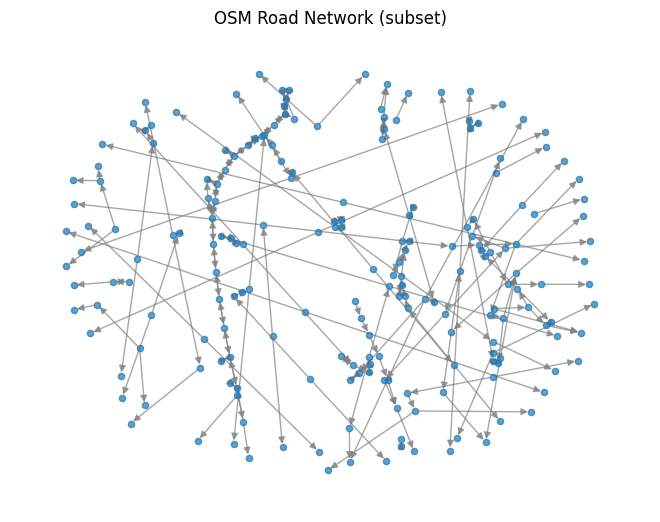
For large networks, plotting the full graph may be slow. We can plot a subset or use simplified layouts.
# Plot a subset of 200 nodes
nodes_to_plot = list(osm_graph.nodes())[:200]
subgraph = osm_graph.subgraph(nodes_to_plot)

pos = nx.spring_layout(subgraph, seed=42)  # Layout for visualization
nx.draw(subgraph, pos, node_size=20, alpha=0.7, edge_color="gray")
plt.title("OSM Road Network (subset)")
plt.show()
Step 4: Analyze the Network
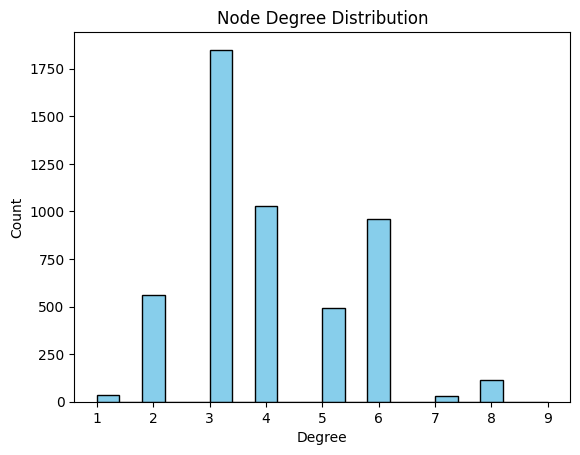
Example 1: Node Degree Distribution
degrees = [d for _, d in osm_graph.degree()]
plt.hist(degrees, bins=20, color="skyblue", edgecolor="black")
plt.title("Node Degree Distribution")
plt.xlabel("Degree")
plt.ylabel("Count")
plt.show()
Example 2: Shortest Path
nodes = list(osm_graph.nodes())
source, target = nodes[4], nodes[100]

if nx.has_path(osm_graph, source, target):
    path = nx.shortest_path(osm_graph, source=source, target=target, weight="length")
    print(f"Shortest path from {source} to {target}: {path}")
else:
    print(f"No path between {source} and {target}")
Shortest path from 275040659 to 237778731: [275040659, 4645845447, 275039976, 275039996, 275039004, 275039006, 275039569, 275039571, 275039573, 275039581, 237781112, 237780985, 237780952, 9721054783, 9721054780, 237780917, 6019817960, 237780906, 6019817962, 237780890, 390982212, 237780887, 237780883, 390982225, 237780876, 237780870, 237780867, 275046222, 260493224, 260493230, 260493232, 260493234, 260493236, 261658959, 261652009, 261652627, 261652013, 261651583, 261651585, 261651587, 261651589, 261656390, 259717434, 260488314, 390927291, 2175348075, 390927293, 390927203, 11812484240, 262247521, 237778698, 237778705, 237778710, 237778718, 237778727, 237778731]
Step 5: Export the Graph
You can save the graph for use in tools like Gephi, Cytoscape, or for later analysis.
gf.export_graph(osm_graph, source="osm", path="osm_graph.graphml")
✅ Graph exported to: /content/osm_graph.graphml
Summary
Fetched an OSM road network with
graphfaker.Visualized the network and subsets for clarity.
Explored basic metrics like degree and shortest paths.
Exported the network for external use.